發表文章

clone VM from AHV to ESXi

圖片
clone VM from AHV to ESXi Reference article: https://acropolis.ninja/export-a-vm-from-nutanix-ahv-to-vmware-esxi/ get vmdk UUID acli vm.get {VM name} export vmdk qemu-img convert -O vmdk nfs://127.0.0.1/{container}/.acropolis/vmdisk/{vmdk UUID} nfs://127.0.0.1/{export container}/{export vmdk name.vmdk} & verify export vmdk processing ps -A |grep qemu if show nothing or done,it’s mean completed mount this comtainer to ESXi host create VM for this vmdk and copy the vmdk file to the VM directory ssh to ESXi host cp {source vmdk path} {destination path} & you can use winscp to verify the copy schedule create the vmdk disk descriptor(Nutanix default use Thin Provisioned) vmkfstools -i {source vmdk} {new vmdk} -d thin mount this vmdk on ESXi VM and it should be power on success if the OS is windows 10,need UEFI boot edi...
AHV - migrate specific VM to other node with time

because AHV GUI  can not migrate mutiple VM at one click if you want migrate mutiple VM, you only can one by one select & migrate with GUI or use script (maybe next or next next or next next next version NOS can be resolve...I hope ) this script can migrate VM with similar VM name or specifice VM _________________________ #!/bin/bash # # acli host.list echo "input the VMs that you want to migrate(ex. vm1,vm2,testvm*)" read VM echo "input the destnation host IP...(press ENTER will automatically select host)" read HOST startdate=`date` if [ ! -n "$HOST" ] ; then acli vm.migrate $VM else acli vm.migrate $VM host=$HOST fi echo "start date: $startdate" echo "  end date: `date`" _________________________

AHV - migrate all VM on one node to other node

because my customer got VM fail after he set one node to maintenance mode so...he want a script can manually migrate VM to other node before node enter maintenance __________________________ #!/bin/bash VM=(`virsh list | grep -i -v cvm|gawk -F' ' '{printf("%s\n",$2);}'|awk 'NR>3{print p}{p=$0}'`) for i in ${VM[@]}; do acli vm.migrate $i;done __________________________

Easy way for Try out o365 E3 - Step2 - Install Azure AD connect sync AD account to o365

圖片
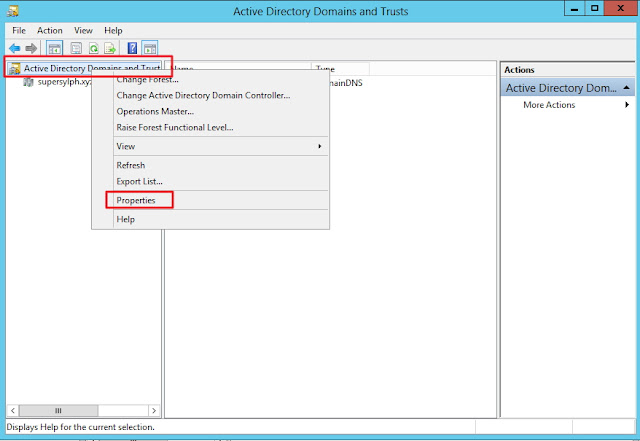
本來是打算把調整on-premise AD的部份弄成一篇 看一看圖好像也沒啥東西好解釋(其實就找個script去把整個ad使用者UPN修改罷了) 就順便當英文練習...如果有不當用字地方再煩請指教 in Active Directory user account default UPN  is SanAccountName @ domain name in AD service we can login use domain \ SanAccountName or SanAccountName @ domain name but in o365 only allowed SanAccountName @ domain name formate   before sync AD user to o365 if internal AD domain name different  with SMTP domain you should change UPN as your SMTP domain open Active Directory Domains and Trusts console for add new UPN Add your SMTP domain as new UPN suffix and change user UPN as your SMTP domain  loginDirect Sync server with Domain Admin account login o365 portal Active users - more  - Directory Synchronization       Direct Sync management check 51-250 or hi...

Easy way for Try out o365 E3 - Step1 - Domain setting

圖片
其實這東西之前還滿常拿來做測試的 一方面是先前就想留點這種基本設定相關的record 另一方面是最近剛好有客戶需要做建置 有些細節要稍微確認一下(沒辦法..我是案子做完就會馬上忘了的那種類型) Office 365 企業版 E3 https://products.office.com/zh-tw/business/office-365-enterprise-e3-business-software 基本上M$在這方面還算大方 就是點下去申請後就給你玩一整個月 玩完後帳號資料會保留180天才砍掉 本次測試內容: on-premise AD account Sync to O365 & Enable O365 user E-mail account 環境: on-premise domain: supersylph.xyz o365 domain: labex5566.onmicrosoft.com SMTP domain: supersylph.com on-premise server DC+DNS*1 Direct Sync *1 Logon O365 admin account https://login.microsoftonline.com/ setting-domain  add your SMTP domain if your external DNS server is Godaddy you can login Godaddy Account to auto set DNS record else you should add record manual click verify it will show what record you should add in your DNS zone Add it and wait for 10 minutes verify again because o365 E3 contains other service,this DNS record page show the all records for all service this lab just test mail fun...